

Understand Anything: Hiểu codebase 200.000 dòng trong vài phút với knowledge graph tự sinh từ AI

Tóm tắt nhanh:
- Understand Anything là một plugin mã nguồn mở do Lum1104 phát triển, sử dụng multi-agent pipeline để phân tích codebase và biến nó thành knowledge graph tương tác.
- Mỗi file, function, class, dependency trở thành một node có thể click, search, explore trong một dashboard trực quan.
- Tương thích nhiều nền tảng AI coding: Claude Code (native plugin), Cursor, VS Code + GitHub Copilot, Copilot CLI, Codex, OpenCode, Gemini CLI, Hermes, Cline, Trae, KIMI CLI, Antigravity, Vibe CLI, Pi Agent, OpenClaw.
- Kết hợp Tree-sitter (static parser, deterministic) với LLM (semantic understanding) – cho graph reproducible mà vẫn nắm bắt được intent.
- Hỗ trợ incremental update – chỉ re-analyze file thay đổi; có thể bật post-commit hook tự cập nhật.
- Sinh guided tours, semantic search, diff impact analysis, business domain mapping, layer visualization, onboarding guides.
- License MIT, output là JSON nên có thể commit vào git và chia sẻ với cả team.
Bạn vừa join team mới. Repo có 200.000 dòng code, 15 microservice, 7 ngôn ngữ lập trình, và không ai có thời gian onboard cho bạn tử tế. Một README.md ngắn cũn không nói gì về việc data flow đi từ frontend tới database như thế nào. Tài liệu nội bộ thì lỗi thời sau release thứ ba.
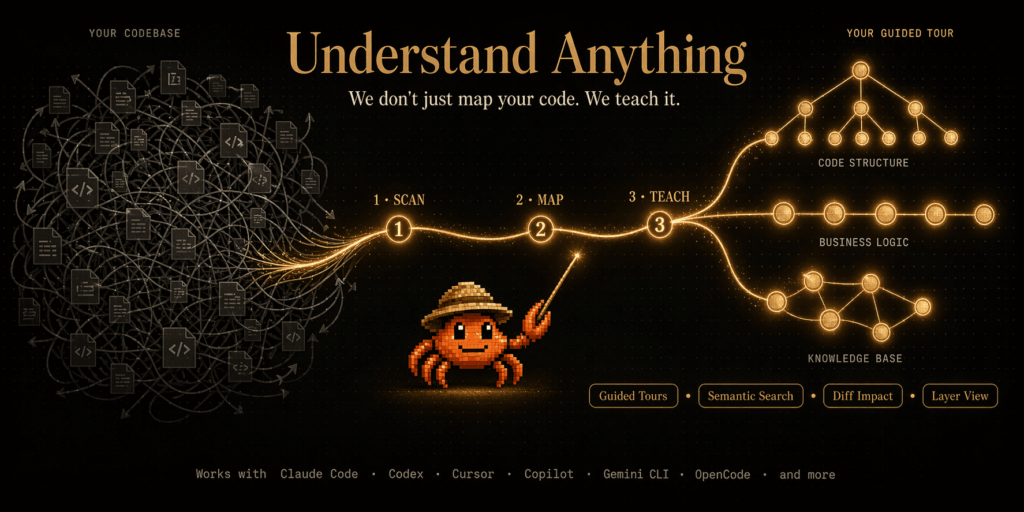
Đây là vấn đề mà Understand Anything giải quyết. Thay vì để bạn đọc code blind, plugin này scan toàn bộ project, gọi LLM phân tích từng file, rồi build một knowledge graph mà bạn có thể pan, zoom, search ngay trong browser. Mỗi node là một file/function/class, mỗi edge là một dependency hoặc call relationship, và mỗi node có summary plain English giải thích nó dùng để làm gì.
Triết lý mà tác giả nêu rất rõ trong README: “The goal isn’t a graph that wows you with how complex your codebase is – it’s a graph that quietly teaches you how every piece fits together.”
Các tính năng nổi bật
Structural graph và domain view
Có hai cách nhìn chính. Structural graph hiển thị từng file, function, class với mọi import/call/inheritance như một mạng lưới interactive. Domain view thì map code sang business process – những thứ như “payment flow”, “user onboarding”, “billing cycle” được trình bày dạng horizontal graph với steps tuần tự. Cực kỳ tiện cho PM hoặc tech lead muốn giải thích kiến trúc cho stakeholder không technical.
Guided tours và semantic search
Plugin tự sinh walkthroughs theo dependency order – bạn được dẫn qua codebase theo đúng trình tự nên đọc, không phải file main.ts mà là file foundational nhất. Semantic search cho phép hỏi tự nhiên: “phần nào xử lý auth?”, “code nào chịu trách nhiệm gửi email?” – kết quả ra ngay với node liên quan được highlight.
Diff impact analysis
Đây là tính năng đắt giá cho code review. Trước khi commit, chạy /understand-diff để xem ripple effect của thay đổi – những phần nào sẽ bị ảnh hưởng, có function nào downstream có thể break. Giúp tránh “tôi sửa một dòng và làm sập production” – một tình huống quá quen thuộc.
Persona-adaptive UI và layer visualization
Dashboard tự điều chỉnh độ chi tiết theo người dùng: junior dev thấy nhiều giải thích hơn, power user thấy nhiều node hơn, PM thấy domain view nhiều hơn. Đồng thời tự nhóm node theo architectural layer (API, Service, Data, UI, Utility) với màu sắc rõ ràng.
Phân tích cả knowledge base, không chỉ code
Lệnh /understand-knowledge có thể trỏ vào một LLM wiki theo pattern Karpathy (markdown vault với wikilinks) và sinh force-directed knowledge graph với community clustering. Phù hợp cho team có Obsidian vault nội bộ muốn visualize quan hệ giữa các concept.
Hướng dẫn cài đặt Understand Anything
Tuỳ vào AI coding tool bạn đang dùng, có ba con đường cài đặt.
Cài cho Claude Code (native plugin)
/plugin marketplace add Lum1104/Understand-Anything
/plugin install understand-anything
Đây là cách native nhất – plugin được tích hợp đầy đủ qua Claude Code plugin marketplace.
One-line install cho các platform khác
Cho Codex, OpenCode, Gemini CLI, Vibe CLI, VS Code Copilot, Hermes, Cline, KIMI CLI, Trae, Antigravity, OpenClaw, Pi Agent:
macOS / Linux:
curl -fsSL https://raw.githubusercontent.com/Lum1104/Understand-Anything/main/install.sh | bashHoặc chỉ định platform trực tiếp:
curl -fsSL https://raw.githubusercontent.com/Lum1104/Understand-Anything/main/install.sh | bash -s codexWindows (PowerShell):
iwr -useb https://raw.githubusercontent.com/Lum1104/Understand-Anything/main/install.ps1 | iexInstaller sẽ clone repo về ~/.understand-anything/repo và tạo symlink phù hợp cho platform bạn chọn. Sau khi cài, restart CLI/IDE để load plugin.
Cursor và VS Code Copilot (auto-discovery)
Với Cursor và VS Code + GitHub Copilot (v1.108+), bạn chỉ cần clone repository và mở project – plugin được tự động phát hiện qua file .cursor-plugin/plugin.json hoặc .copilot-plugin/plugin.json. Không cần thao tác cài thủ công.
Nếu auto-discovery không hoạt động trên Cursor, vào Cursor Settings → Plugins, paste URL https://github.com/Lum1104/Understand-Anything để cài thủ công.
Copilot CLI
copilot plugin install Lum1104/Understand-Anything:understand-anything-pluginSử dụng Understand Anything: Workflow điển hình
Bước 1: Scan codebase
Mở terminal AI agent của bạn (Claude Code, Cursor chat panel, Codex…), gõ:
/understandMulti-agent pipeline sẽ chạy: scanner phát hiện ngôn ngữ và framework, file-analyzer extract function/class/import (song song tối đa 5 process, 20-30 file mỗi batch), architecture-analyzer gán layer, tour-builder sinh learning tour, graph-reviewer validate completeness. Kết quả: file .understand-anything/knowledge-graph.json chứa toàn bộ graph data.
Với codebase trung bình (10-50K dòng), quá trình mất khoảng 3-10 phút tuỳ tốc độ LLM provider.
Bước 2: Sinh content tiếng Việt (nếu cần)
/understand --language zhPlugin hỗ trợ en, zh, zh-TW, ja, ko, ru. Tham số --language ảnh hưởng tới node summary, dashboard UI labels và guided tour explanations.
Bước 3: Mở dashboard
/understand-dashboardMột web dashboard interactive mở trong browser. Bạn có thể pan, zoom, search; click vào node để xem code snippet, relationships và summary plain English. Nhóm theo layer được phân biệt bằng màu sắc.
Bước 4: Khai thác các command bổ sung
Một số command hữu ích khác:
/understand-chat How does the payment flow work?Hỏi free-form về codebase, agent dựa vào graph để trả lời chính xác.
/understand-diffPhân tích impact của các thay đổi chưa commit.
/understand-explain src/auth/login.tsDeep-dive một file cụ thể, kèm explanation chi tiết.
/understand-onboardSinh onboarding guide cho thành viên mới – thực sự tiết kiệm thời gian cho team lead.
/understand-domainExtract business domain knowledge – domain, flow, step.
/understand-knowledge ~/path/to/wikiPhân tích Karpathy-pattern LLM wiki thành knowledge graph.
/understand src/frontendScope analysis vào subdirectory cụ thể – cần thiết cho monorepo lớn.
/understand --auto-updateBật post-commit hook tự cập nhật incremental sau mỗi commit.
Cơ chế hoạt động: Tree-sitter + LLM hybrid
Điểm thiết kế thông minh nhất của Understand Anything là kết hợp hai loại tool có ưu thế khác nhau:
Tree-sitter (deterministic) parse source thành concrete syntax tree, extract structural facts: import, export, function/class definition, call site, inheritance. Output ổn định – cùng input thì cùng output mọi lần chạy. Cũng làm fingerprint-based change detection cho incremental update.
LLM (semantic) đọc parsed structure cùng source gốc để sinh ra những thứ parser không làm được: summary plain English, tag, gán architectural layer, business-domain mapping, guided tour, language concept callouts.
Sự phân chia này đảm bảo graph reproducible ở mặt structural trong khi vẫn capture được intent ở mặt semantic – “file này dùng để làm gì”, không chỉ “file này import những gì”.
Chia sẻ graph với cả team
Graph là JSON thuần – bạn có thể commit vào git và teammate skip toàn bộ pipeline. Cực kỳ phù hợp cho onboarding, PR review, và docs-as-code workflow.
Những gì nên commit: tất cả trong .understand-anything/ trừ intermediate/ và diff-overlay.json (đây là local scratch). Thêm vào .gitignore:
.understand-anything/intermediate/
.understand-anything/diff-overlay.json
Với graph lớn (10MB+), dùng git-lfs:
git lfs install
git lfs track ".understand-anything/*.json"
git add .gitattributes .understand-anything/
Sau release, chạy lại /understand để refresh, hoặc bật --auto-update để mỗi commit kèm graph patch tương ứng.
Đối với bất kỳ team nào đang vật lộn với onboarding chậm, code review thiếu context, hay tài liệu lỗi thời, Understand Anything là một công cụ đáng thử nghiệm ngay tuần này. Việc hỗ trợ đa nền tảng (từ Claude Code, Cursor, Copilot tới Gemini CLI, Codex, OpenCode…) khiến nó không bị khoá vào một vendor cụ thể – bạn có thể switch giữa các AI tool mà vẫn giữ nguyên graph đã build.