
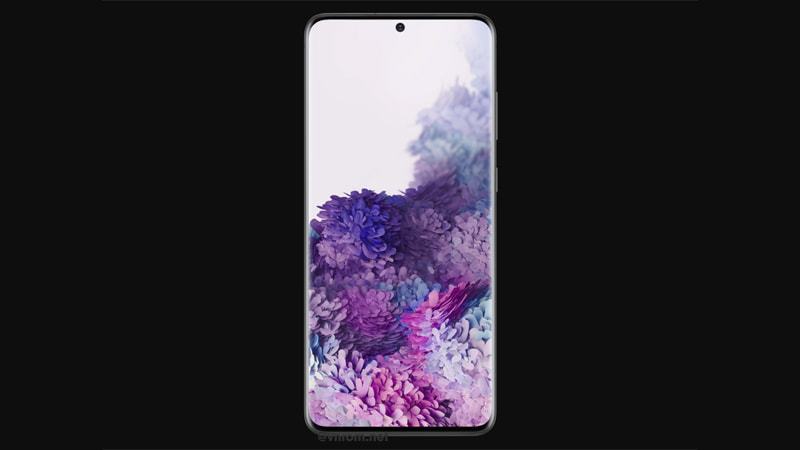
Tại đây bạn có thể tải về bộ file ROM gốc (Stock Firmware) chính thức mới nhất cho Tổng hợp ROM combination, ROM full cho Samsung Galaxy S20 Plus . Các file này cực kỳ cần thiết để khắc phục các sự cố phần mềm, sửa lỗi treo logo (bootloop), nâng cấp/hạ cấp hệ điều hành hoặc khôi phục thiết bị về trạng thái nhà sản xuất.
| Màn hình | |
| Vi xử lý (Chip) | |
| Bộ nhớ (RAM/ROM) | |
| Hệ điều hành | |
| Dung lượng pin |
Chuẩn bị & Lưu ý trước khi thực hiện
- Sao lưu dữ liệu: Quá trình chạy ROM sẽ xóa sạch toàn bộ dữ liệu trên máy. Hãy sao lưu các tập tin quan trọng trước khi làm.
- Dung lượng pin: Đảm bảo thiết bị của bạn có mức pin tối thiểu 50% để tránh sập nguồn giữa chừng.
- USB Driver & Công cụ: Cài đặt driver phù hợp cho máy tính và chuẩn bị sẵn công cụ flash (Odin, SP Flash Tool, QFIL… ).
CHÚ Ý: Việc nạp phần mềm hệ thống luôn tiềm ẩn rủi ro gây brick (hỏng máy). Hãy thực hiện cẩn thận và tự chịu mọi rủi ro. vnROM không chịu trách nhiệm đối với các hư hỏng phát sinh.
Download ROM & Firmware
Samsung Galaxy S20 Plus (SM-G985F)
| File Type | AP / PDA Build (Binary) | Region (CSC) | OS Version | Download Link |
|---|---|---|---|---|
| Combination | COMBINATION | G985FXXU7AUC7 | – | Google Drive |
| Combination | COMBINATION | G985FXXU6AUA1 | – | Google Drive |
| Combination | COMBINATION | G985FXXU5ATJ1 | – | Google Drive |
| Combination | COMBINATION | G985FXXU4ATG8 | – | Google Drive |
| Combination | COMBINATION | G985FXXU3ATG7 | – | Google Drive |
| Combination | COMBINATION | G985FXXU2ATG6 | – | Google Drive |
| Combination | COMBINATION | G985FXXU1ATG5 | – | Google Drive |
| Stock / full | G985FOXBNHYB2 | XXV (Vietnam) | Android 13 (One UI 5) | Google Drive |
| Stock / full | G985FOXBMHXJ4 | XXV (Vietnam) | Android 13 (One UI 5) | Google Drive |
| Stock / full | G985FOXBLHXG4 | XXV (Vietnam) | Android 13 (One UI 5) | Google Drive |
| Stock / full | G985FOXBKHXEB | XXV (Vietnam) | Android 13 (One UI 5) | Google Drive |
| Stock / full | G985FOXBJHXA2 | XXV (Vietnam) | Android 13 (One UI 5) | Google Drive |
| Stock / full | G985FOXBIHWHE | XXV (Vietnam) | Android 13 (One UI 5) | Google Drive |
| Stock / full | G985FOXMHHWED | XXV (Vietnam) | Android 13 (One UI 5) | Google Drive |
| Stock / full | G985FOXBGHWCG | XXV (Vietnam) | Android 13 (One UI 5) | Google Drive |
| Stock / full | G985FXXSFGVK3 | XXV (Vietnam) | Android 13 (One UI 5) | Google Drive |
| Stock / full | G985FXXSFFVIH | XXV (Vietnam) | Android 12 (One UI 4) | Google Drive |
| Stock / full | G985FXXUEFVG5 | XXV (Vietnam) | Android 12 (One UI 4) | Google Drive |
| Stock / full | G985FXXSDFVC9 | XXV (Vietnam) | Android 12 (One UI 4) | Google Drive |
| Stock / full | G985FXXSCEUL9 | XXV (Vietnam) | Android 12 (One UI 4) | Google Drive |
| Stock / full | G985FOXBBDUI5 | XXV (Vietnam) | Android 11 (One UI 3) | Google Drive |
| Stock / full | G985FOXBADUH5 | XXV (Vietnam) | Android 11 (One UI 3) | Google Drive |
| Stock / full | G985FOXB9DUH2 | XXV (Vietnam) | Android 11 (One UI 3) | Google Drive |
| Stock / full | G985FOXB8DUF9 | XXV (Vietnam) | Android 11 (One UI 3) | Google Drive |
| Stock / full | G985FOXB7DUE1 | XXV (Vietnam) | Android 11 (One UI 3) | Google Drive |
| Stock / full | G985FOXM6DUB5 | XXV (Vietnam) | Android 11 (One UI 3) | Google Drive |
| Stock / full | G985FOXB5BTJ3 | XXV (Vietnam) | Android 11 (One UI 3) | Google Drive |
| Stock / full | G985FXXU4BTIB | XXV (Vietnam) | Android 10 (One UI 2) | Google Drive |
| Stock / full | G985FXXU3ATG4 | XXV (Vietnam) | Android 10 (One UI 2) | Google Drive |
| Stock / full | G985FXXU2ATE6 | XXV (Vietnam) | Android 10 (One UI 2) | Google Drive |
| Stock / full | G985FXXU1ATD3 | XXV (Vietnam) | Android 10 (One UI 2) | Google Drive |
Hướng dẫn flash ROM
Để nạp ROM gốc hoặc các file Combination cho thiết bị Samsung của bạn, vui lòng tham khảo bài hướng dẫn chi tiết của chúng tôi tại đây: [HƯỚNG DẪN] Cách sử dụng công cụ Odin để chạy ROM gốc cho các thiết bị Samsung.


s20+ của mình bấm chụp ảnh màn hình nó không hiện bảng đó thì sao ad